
Comprehensive Guide to Optimizing UX Flows for SaaS Success
Over 60 percent of American SaaS users abandon products due to confusing user journeys and friction points that stall their progress. For product managers and UX designers at mid-sized companies, spotting and removing these blockers is vital for global growth and customer retention. By learning to audit and redesign user flows, you can surface hidden pain points, clarify interfaces, and create seamless experiences that directly improve usability and conversion rates across markets.
Table of Contents
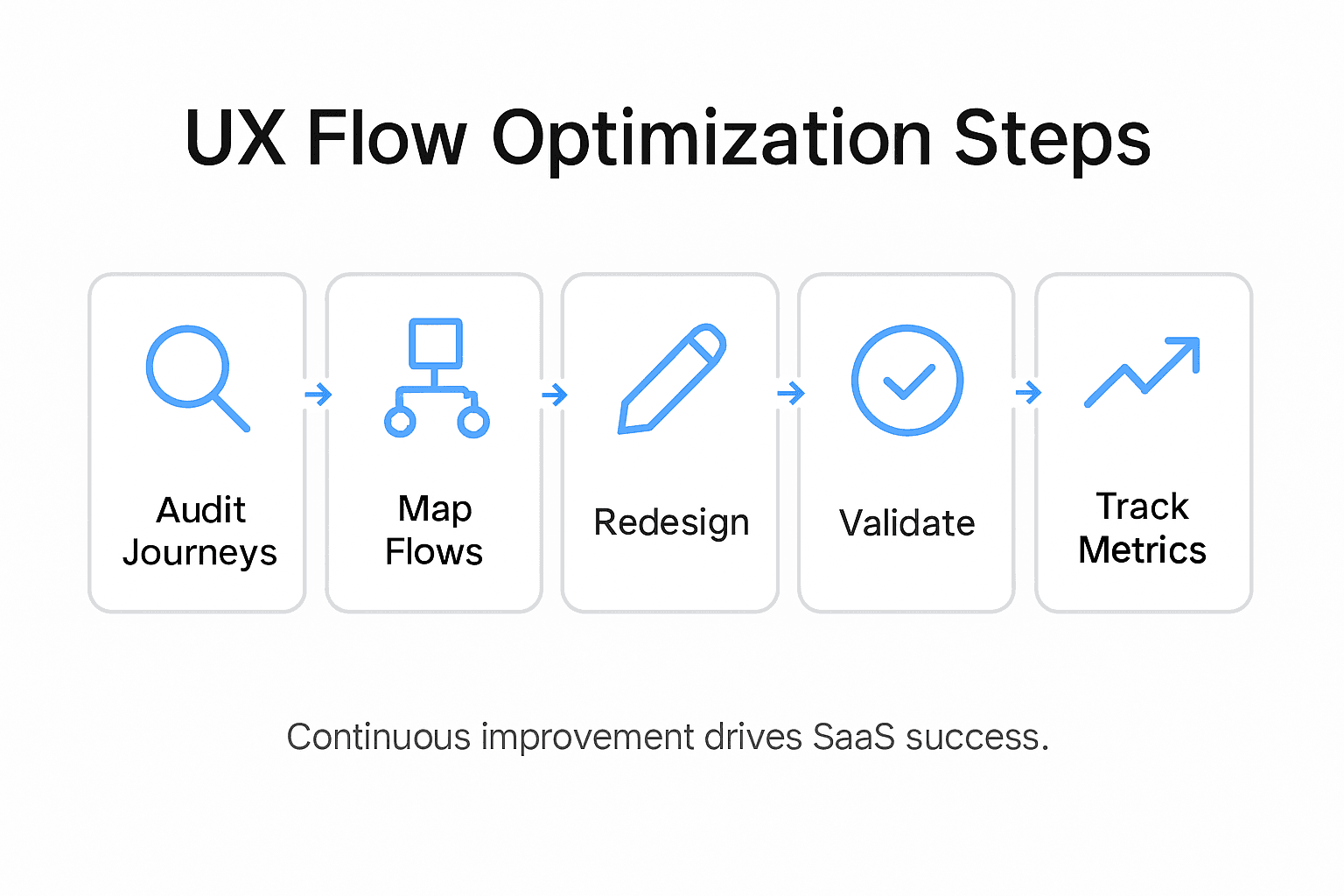
- Step 1: Audit Existing User Journeys For Pain Points
- Step 2: Map Out Frictionless UX Flows Aligned To Business Goals
- Step 3: Redesign Key Interfaces For Clarity And Usability
- Step 4: Validate New Flows Through User Testing
- Step 5: Track Performance And Iterate On UX Improvements
Quick Summary
| Key Point | Explanation |
|---|---|
| 1. Audit user journeys for pain points | Identify friction points in user interactions to enhance experience and product adoption. Gather qualitative and quantitative data for a comprehensive analysis. |
| 2. Align UX flows with business goals | Design user experiences that support key business objectives, ensuring each interaction aids user progression toward conversion stages. |
| 3. Redesign interfaces for usability | Create intuitive interfaces by simplifying workflows and ensuring clear visual hierarchies that facilitate user task completion. |
| 4. Validate designs through user testing | Gather empirical evidence on usability improvements by observing real user interactions during testing. Employ mixed methods for robust feedback. |
| 5. Track metrics and iterate improvements | Continuously measure user experience metrics and use insights for ongoing design refinements, ensuring user needs are systematically addressed. |
Step 1: Audit existing user journeys for pain points
Understanding your SaaS product’s user journey is critical for identifying potential friction points that might prevent users from achieving their goals. By systematically mapping out each interaction and touchpoint, you can uncover hidden barriers that impact user experience and product adoption.
To effectively audit user journeys, start by gathering comprehensive data from multiple sources. Combining journey maps with machine learning-based classification techniques can help you systematically extract insights from user interactions. Begin by collecting qualitative feedback through user interviews, support ticket reviews, and customer feedback channels. Simultaneously, analyze quantitative data from product analytics, tracking user paths, drop-off rates, and interaction times across different stages of your product.
Next, visually map out the entire user journey, breaking down each step from initial awareness to activation and ongoing usage. Pay special attention to transitions between stages where users might experience confusion or encounter obstacles. By integrating both explicit and implicit user experience data, you can develop a more holistic understanding of potential pain points that might not be immediately apparent through traditional analysis methods.
Pro tip: Create a color-coded journey map that highlights friction points in red, neutral interactions in yellow, and smooth experiences in green to quickly visualize areas needing improvement.
Here is a concise summary of key user journey stages with typical friction points and recommended data sources:
| User Journey Stage | Common Friction Points | Recommended Data Sources |
|---|---|---|
| Awareness | Low engagement, unclear value | Analytics, user interviews |
| Activation | Confusing onboarding steps | Support tickets, journey mapping |
| Ongoing Usage | Feature discovery barriers | Usage data, qualitative feedback |
| Retention | Dropping engagement, unmet needs | Customer surveys, churn analysis |
Step 2: Map out frictionless UX flows aligned to business goals
Creating a user experience that seamlessly supports your business objectives requires a strategic approach to designing product interactions. Your goal is to develop UX flows that not only meet user needs but also directly contribute to your core business outcomes.
Aligning UX flows with the established Business Model Canvas provides a comprehensive framework for integrating user experience directly with strategic business priorities. Start by identifying your key business objectives and mapping how each user interaction can support those goals. This means analyzing each touchpoint to ensure it drives user progression through critical conversion stages while maintaining a smooth and intuitive experience. Consider how your UX design can reduce friction at each step while simultaneously supporting revenue generation, user activation, and long term product engagement.
Break down your user journey into distinct stages, carefully examining how each interaction supports both user needs and business metrics. Develop user personas that reflect your target customer segments, and design flows that make it effortless for users to accomplish their primary objectives. Pay close attention to conversion points, onboarding processes, and feature discovery mechanisms that guide users toward valuable product interactions.
Pro tip: Create a side-by-side comparison chart that maps user needs against business goals for each stage of the user journey, highlighting where optimal alignment can be achieved.
Step 3: Redesign key interfaces for clarity and usability
Redesigning your SaaS product interfaces requires a strategic approach that transforms complex interactions into intuitive user experiences. Your objective is to create interfaces that are not just visually appealing but fundamentally functional and user friendly.

Systematic user-centered design techniques provide proven frameworks for transforming complex interfaces into more navigable and accessible solutions. Begin by conducting comprehensive user research to understand current pain points and interaction challenges. Analyze existing interface elements critically examining how users currently navigate and complete tasks. Focus on simplifying complex workflows, reducing cognitive load, and creating clear visual hierarchies that guide users naturally through key product functions.
Implement a rigorous prototyping and testing approach that involves multiple iterations of design refinement. Develop low fidelity wireframes that capture core interaction models, then progressively enhance them with detailed visual design. Utilizing design thinking methodology can significantly improve navigation and accessibility through structured user interviews, journey mapping, and iterative testing processes. Collect quantitative usability metrics and qualitative feedback to validate design improvements, ensuring that each interface modification directly addresses user needs and simplifies critical interaction paths.
Pro tip: Create a design change tracking document that maps each interface modification against specific user experience improvement metrics to maintain clear accountability for your redesign efforts.
Step 4: Validate new flows through user testing
Validating your redesigned user interfaces requires a systematic approach that goes beyond intuitive assumptions. Your goal is to gather empirical evidence that confirms your design modifications genuinely improve user experience and product usability.
A comprehensive framework for validating user experience flows provides strategic methods for rigorously testing design changes. Begin by recruiting a diverse group of representative users who mirror your target customer segments. Develop realistic test scenarios that simulate actual product interactions, focusing on key user journeys and complex workflows. Use both moderated and unmoderated testing approaches to capture different dimensions of user behavior and interaction patterns. Create specific tasks that require users to complete critical product functions, carefully observing their navigation strategies, time to completion, and emotional responses.
Implement a mixed methods evaluation approach that combines quantitative metrics with qualitative feedback. Track performance indicators like task completion rates, time spent on specific interfaces, error frequencies, and user satisfaction scores. Conduct in depth interviews and collect verbal feedback to understand the underlying cognitive processes and emotional experiences driving user interactions. Pay close attention to moments of confusion, unexpected navigation patterns, and areas where users deviate from your intended interaction design. Use these insights to iteratively refine your interfaces, making incremental improvements that systematically enhance overall usability and user satisfaction.
Pro tip: Record user testing sessions with screen and facial capture technology to analyze subtle interaction nuances that participants might not explicitly articulate during feedback discussions.
This table compares core UX evaluation methods for redesign validation, showing strengths and ideal usage:
| Method | Strengths | Best Used For |
|---|---|---|
| Moderated Testing | In-depth behavior insights | Complex workflows, new features |
| Unmoderated Testing | Large-scale pattern detection | Fast feedback, interface tweaks |
| Usability Metrics | Quantitative performance | Benchmarking improvements |
| In-depth Interviews | Understand user mindset | Emotional responses, pain points |
Step 5: Track performance and iterate on UX improvements
Continuous improvement of your product’s user experience requires a structured approach to measuring and analyzing performance metrics. Your goal is to transform raw data into actionable insights that drive meaningful UX enhancements.
A systematic review of contemporary UX measurement practices provides critical guidance for implementing robust tracking mechanisms. Start by establishing a comprehensive set of key performance indicators that capture both quantitative and qualitative aspects of user interaction. Focus on metrics that directly reflect user satisfaction, such as task completion rates, time on task, error frequencies, and user sentiment scores. Create a standardized tracking dashboard that allows you to monitor these indicators consistently and identify trends over time.
Develop an iterative feedback loop that transforms measurement into continuous improvement. Implement a structured process for collecting and analyzing UX metrics that goes beyond surface level data. Conduct regular user interviews, analyze support tickets, and correlate quantitative metrics with qualitative feedback. Use statistical analysis to identify significant patterns and prioritize design modifications. Set up A/B testing frameworks that allow you to experimentally validate potential improvements, ensuring that each design iteration is backed by empirical evidence and directly addresses user needs.
Pro tip: Create a quarterly UX performance report that not only presents metrics but also tells a narrative about user experience progression, highlighting specific improvements and their measurable impact.
Optimize Your SaaS UX Flows with Expert Design Partners
The article highlights the critical challenges SaaS companies face in diagnosing friction points, aligning user experience with business goals, and validating impactful design changes. If you are struggling with disconnected user journeys or unclear interface usability that slows activation and retention, you are not alone. Key concepts such as “user journey auditing,” “frictionless UX flows,” and “iterative validation through user testing” underscore the importance of expert attention and precise strategies to break through common UX barriers.
At The Good Side Oy, we specialize in transforming these exact pain points into seamless, high-converting product experiences. Our senior SaaS designers combine deep user research with strategic positioning to deliver end-to-end user journey optimization that drives meaningful activations and boosts revenue. By partnering with us, you gain flexible access to a network of over 100 SaaS-focused experts who will help you simplify complex workflows, enhance clarity, and create intuitive interfaces that keep users engaged.
Explore how strategic UX design can accelerate your product’s market success. Start with a free design audit to uncover hidden user pain points and follow with tailored solutions crafted just for your SaaS goals. Don’t let disconnected flows hold your product back.
Take action now and build user journeys that truly convert. Learn more about our expert-driven approach to user journey optimization and start your transformation today.
Frequently Asked Questions
How can I identify friction points in my SaaS product’s user journey?
To identify friction points, gather both qualitative and quantitative data from user interactions, such as user interviews and analytics. Map out the entire user journey and highlight areas of confusion or obstacles, aiming to uncover hidden barriers within 30 days.
What steps should I take to align UX flows with my business goals?
Begin by clearly defining your key business objectives and analyzing how each user interaction can contribute to these goals. Create a side-by-side comparison of user needs against business goals and refine UX flows accordingly to ensure they effectively drive user engagement and conversions.
How do I approach redesigning interfaces for improved usability?
Focus on simplifying complex workflows and creating clear visual hierarchies that guide users. Conduct user research to understand pain points, develop low-fidelity wireframes, and iterate on designs based on user feedback to achieve clearer, more functional interfaces within the redesign process.
What methods can I use to validate my new UX flows?
Utilize a combination of moderated and unmoderated user testing to observe real user interactions with your new designs. Track performance indicators like task completion rates and gather qualitative feedback to identify areas for further improvement.
How often should I track UX performance and make iterative improvements?
Establish regular monitoring of key performance indicators on a quarterly basis to evaluate user satisfaction and interaction metrics. Use this data to guide continuous improvements, aiming for incremental enhancements that can be implemented within a typical quarter cycle.
What key performance indicators should I focus on for UX measurement?
Focus on metrics such as task completion rates, time on task, and user satisfaction scores to gauge overall usability. Set up a standardized dashboard to track these indicators consistently and identify meaningful trends over time.